Wednesday, March 7, 2012

Cutting Expenses Part 2

An area where cuts can help a lot with your bottom line is utilities, primarily heating and cooling. Of course, the cost of utilities vary greatly depending on where you live, both because of the climate and the cost of power. The latter varies greatly with the source of power. Several years ago the cost of natural gas became extremely high and people who used it were wishing they could heat with electricity. Now, natural gas prices are down, and the reverse is true. But apart from the type of energy you use for heating and cooling, the only real way to control its usage, assuming your house is insulated properly, is to lower the thermostat in the winter and raise it in the summer. (And by lowering and raising, we do not mean moving it close to the floor in the winter and near the ceiling in the summer.) We know this can be difficult, especially for older people. We used to keep our house at about 70 deg in the winter, but as we aged, this became unacceptable. So, now we keep it at 73 deg. Right now we can afford that, but should prices rise, we may have to resort to using space heaters just in the part of the house we are currently in or bundling up more. We have always kept the house at 78 deg in the summer, but Randy has to supplement with fans to be comfortable as he is more warm natured than Kathy. Anyway, in your case, you just have to find a balance between comfort and your checking account.

Other big power users are stoves, ovens, and clothes dryers. So, if you can limit the usage of stoves and ovens for cooking, you can save money. But if you make the alternative to eat out, then you’ve just shifted a few dollars in savings on utilities to a lot of dollars of non-savings on food. One thing we do is to use a toaster oven for smaller items rather than heating up the big oven. If push comes to shove, the clothes dryer can be eliminated altogether by using the old fashioned method of drying: hanging on a clothes line in the back yard. This may not be feasible when the weather is bad, but we can remember as a child having clothes hanging on racks around the house when it was raining. And we can also remember having ice on our clothes when they were hung outside and the weather turned cold unexpectedly. The point is: use your best judgment about when to use certain types of energy. If your budget is tight, these are the types of decisions that must be made on a daily basis.


Little things you can do include: turning off lights and devices when not being used, letting sunlight into the house in the winter and blocking it in the summer, putting insulation on your hot water heater, using fluorescent bulbs rather than incandescent, taking fewer hot showers in the winter, and hand-washing dishes rather than using a dish washer. In general, just become more aware of how you are using energy around the house and cut where possible.

Another area for a large potential in savings is communications. Are you paying for a landline phone service? Cell phone service? TV service? Internet service? Pager service? There are so many communication services available, it can eat up a lot of money. When it’s all said and done, you could eliminate all these services and still live well. It wasn’t that long ago that many of these services didn’t even exist. We know that in our modern society these things all seem essential, but in reality they are simply just desirable. Even if you decide you don’t want to rid yourself of any of these conveniences, there are ways to lower your cost.

Consolidate. If you have landline phone service with one company, cell phone service with another, and Internet service with yet another, then you can most likely save quite a bit of money by consolidating these services with one company. We just recently rolled our landline phone, TV, and Internet service into a bundle with one company. We will save about $80 per month for the first year and about $40 per month from then on. If you really don’t want to change service, we have heard about other people talking to the companies they currently have service with and asking for a good customer discount. Many times they will give you the same price they offer to first time customers for a year. If asking doesn’t work, you can tell them you are planning to switch your service to another company unless they can give you a better price. Although we still like having a landline phone, we have a lot of friends and family that have dropped this and converted totally to cell service. This can save you money for sure, especially if you bundle the cell service with TV and Internet service.

Another great money drainer is transportation costs. The current high cost of gasoline is driving much of that. However, if you have a proclivity for new expensive cars, most of your problem may be high car payments. If you are on a tight budget, you have no business buying expensive cars. Go for the lower cost vehicles that get high gas mileage. If you can find a decent used one, then you can save even more.


Buying used is what Dave Ramsey recommends, but we personally like buying new vehicles and driving them until they break down and are too expensive to repair and maintain. However, we do invest in having our vehicles serviced regularly, believing that this will prolong the life of the vehicles and thus save us money over the long run. But that’s us. We have a relatively decent income and have been able to afford new cars when needed. However, our son owns a used car and it has served him well now for several years. If our income were lower and we were in need of a vehicle, we wouldn’t hesitate buying used. Also, if you have the skill and the time, you might want to do some of the servicing yourself to save money.

If you live a long distance from your job, you seriously need to think about carpooling to save money. We know this can be inconvenient, but if saving money is your goal, it will be well worth it. If you use public transportation, you might consider riding a bicycle or even walking, if possible and the weather permits.

Be creative. Record how you are spending your money and put together a plan on how to reduce that amount. You must begin to be totally honest with yourself about what is really needed and what is merely wanted. Thinking that something is needed rather than simply wanted leads many people to becoming impulse buyers. They’ll go to the store to pick up a few needed items and leave the store with three times as many wanted items as needed items. This is not good. But some people have a bad habit, or even a compulsion, to rationalize to themselves that a wanted thing is really a needed thing. Like, “I really need an iPad. It’s so much easier to play solitaire while riding down the road than using cards. And I can check my Email without having to get on my computer.” Come on now. That’s not a valid reason. Unless you need an iPad to do your job, then it remains a luxury item for those that want it and can afford it. If you don’t have the money, let the iPad remain at the store. Then have a long discussion with yourself. Conduct an intervention if you will. On YOURSELF. Tell yourself, “I don’t really need all this stuff, I just want it. So, get over it, self! Quit borrowing money to support my spending habits. I’ll be glad I did.” Once you have these ideas firmly planted inside your head, you will find that you really can leave those wanted items on the store shelf. If you find that you cannot, then you may need to seek professional help.

So, let’s stop here. We hope you take these suggestions to heart and that it helps you to live within the budget your income allows.

Wednesday, February 29, 2012

Cutting Expenses

One thing that can destroy relationships quickly is the mishandling of finances. Soon after marrying my wife almost 30 years ago, she told me she wanted us to start a budget. She had heard that one of the most frequent things couples argued about and got divorced over was money. Although I was a bit skeptical, she soon persuaded me that we should have a budget. In those days, home computers were expensive and rarely seen. So our first budget was done using a ledger book. Later, when the Commodore 64 became widely available, we bought one and began keeping our budget in a spreadsheet. This made budgeting much easier and less prone to errors.

Now, after nearly 30 years, we still keep a budget and very much believe in them. It has helped keep us on the straight and narrow when it comes to spending our hard-earned dollars. However, creating a budget is easy; living by it is another matter. For those of you fortunate enough to have relatively good salaries, sticking to a budget may not be difficult at all. However, for those that struggle daily with having enough money to live on, living by a budget may be extremely difficult. For that reason, we now present some ideas on how to cut your household expenditures.

First and foremost, whatever you do, DO NOT look to the federal government for an example of how to run your household. Our leaders have gone bonkers over the last 50 years and are about to drive our entire country into bankruptcy. Did you know that our national debt has now exceeded $15 trillion and that it is projected to increase by about $1.1 trillion in fiscal year 2012 alone. Because of this debt, we spend almost $500 billion a year in interest. Yet, revenues are only expected to be about $2.6 trillion. Let’s scale these numbers down to the average household in the US and see what they look like.


Household income:   $50,000

Total existing debt:   $288,462

Additional debt for 2012:   $21,154

Interest to pay in 2012:   $9,615


Can you imagine being in a situation where you are spending almost 20% of your income just to cover the interest on your debt? Perhaps you can. If you are young and just getting started on your career, you could be in debt this much because of a mortgage and car loans. But keep in mind these are loans you are working to pay off without incurring additional debt (unless you are going wild with the credit cards). But what if you only paid the interest on your debt, never paying anything on the principle. Then, on top of that, you buy new $20,000 cars every year and start making interest payments on them also. This is what the federal government is essentially doing. It is completely unsustainable. The party has to end at some point, hopefully without too much of a hangover. Therefore, we have decided to help you cut your spending should you find yourself in a situation where this is necessary.

The first thing to think about is the absolute essentials of life. These are normally considered to be food and shelter.

Yes, you need a dwelling place. But do you need one as expensive as the one you have?  If you find yourself hating that dream home you own because the cost of the mortgage, taxes, insurance, and upkeep are eating into your lifestyle, it may be time for a change. We like having a DREAM LIFE more than having a DREAM HOME. Of course, it may still be difficult to part with the home, so the first thing to do is to see if you can reduce the mortgage payments by refinancing. You have to be careful here because closing costs can be so high as to negate any benefits of a lower interest. Also, you may find yourself in a situation where the value of your home is less than the amount you owe. But if the overall housing market is depressed in your area, it could still be feasible to greatly reduce your cost of home ownership by selling your existing home at a loss and buying a much lower cost home. Because there are so many factors affecting cost, it is a good idea to consult with a real estate professional about your options.

I have mentioned the cost of food in previous posts. This is the one area that our family tends to have the most problems since we enjoy eating out so much. One of the reasons we shy away from home meals is the time it takes to prepare them and clean up afterwards. We have a fairly busy lifestyle and don’t like taking that big a chunk out of our leisure time. Sure, we could just heat up a can of soup, but we like variety. Some foods simply take time to prepare.

One thing that helps us to eat at home more is planning a week in advance what we will have each night. This allows us to purchase what we are lacking ahead of time and have everything ready to go each evening rather than having to make a run to the grocery store on the spur of the moment. Also, we can plan easier meals for busy nights and more elaborate meals for free nights. If, however, you are on a really tight food budget, planning ahead will be only one step in your savings plan. You may also have to greatly cut back on more expensive food items such as steak, or at least concentrate on the cheaper cuts. We have discovered that even fresh fruit can be expensive because many times the fruit is not good or it spoils before we have time to finish it. Canned and frozen items are better choices for longer term storage.

You might want to start couponing. It’s also a good idea to look for deals on more expensive food items that can be frozen. We buy a large quantity of meat when on sale, vacuum seal it, and put it in the freezer. But if push comes to shove, you may regrettably have to cut out eating some foods that you really like. Better that than going broke.

Another area that can be problematic is the purchasing of technology items. Just look around. Big screen TVs (now with 3D!), stereos, Blu-ray players, cable service, satellite service, computers, laptops, printers, tablets, wireless phones, cell phones, iPods, iMacs, iPhones, iPads, iThis, and iThat. Temptation is all about. Our household consists of tech geeks, liking all these new gadgets. Yet, when you think about it, are they really necessary. No, they are not! If you find yourself spending thousands of dollars you do not have on technology, STOP IT! This is an intervention. Look seriously at what you are spending on these items and scale back to only what your budget allows. You might also consider selling some of your existing stuff on eBay. We’ve got a Nintendo Wii and accessories waiting to be sold right now. Anyone interested? Only those who can afford it need apply.

Look for more savings tips in the next post.


Monday, January 30, 2012

Second Budget

Well, hopefully you made it through setting up your real budget just fine and were able to get all your transactions entered for the first half of the month. It’s now time to examine how your second budget might look. Remember that the Savings column can look either better or worse than it really is after the first budget. It depends on when your paychecks come in. If all paychecks are received twice a month or perhaps every two weeks, then the Savings numbers should reflect reality. However, if one or more paychecks are received only once a month, then the numbers can look good or bad depending on what time of the month they are received. In the case of our sample budget for Jack and Jill, Jill receives two paychecks per month while Jack gets one during the first two weeks of each month. This made their Savings category look really flush with money on the first budget. But as you can see below, the second budget brings the Savings back in line (with a balance of over $300) because Jack has no paycheck being deposited during this budget cycle.

                                Click image for an enlarged view

Download OpenOffice Calc version of this spreadsheet
Download Microsoft Excel version of this spreadsheet

As you can also see, some other regular bills were paid during this half-month cycle. Fortunately, most budget categories held their own. However, it appears that an unexpected plumbing problem cost Jack and Jill $85 and thus put their House Upkeep category in the red. This is okay as long as no other unexpected repairs are needed in the near future. If the overall balance in their checking account remains above zero, then there is no need to panic. Hopefully, the deficit in any given categories can be made up over the next few budget cycles.

The only other possible problem seems to be in Jack’s personal money column. He’s in the red by almost $16. If Jack has at least $16 in his wallet, he is okay; but if not, he needs to watch what he spends over the next budget cycle to make up the deficit.

Cover Art

Notice that Jack and Jill did real well with their Food budget. They ended the month with a surplus of $34. As long as they can maintain this level of spending, all will be well. However, if they begin to loosen up too much and start eating out more, they could find themselves in trouble.

If you found yourselves, in your real budgets, overspending left and right, then all we say is that you must begin changing your mindset right now! We know it can be difficult going from freely spending money to spending a controlled amount. You must begin settling for less. It can be done. Many other people have done it. As you work towards your goal of reducing spending, one thing to keep in mind is that most of what we buy are things we want rather than things we need. If you were to cut your spending to just your needs, you would most likely find yourself spending much less than you are taking in. So, whenever you find yourself wanting to make a purchase, evaluate the necessity of the item and how the purchase will affect your budget’s bottom line. If it’s not really needed and your budget can’t handle it, don’t buy. Keep working at this until the lower spending amounts just come natural to you.

In the next post, we’ll give you a few tips about controlling spending in case you continue to have problems.

Saturday, January 14, 2012

First Budget

Alright, it’s time for the action to begin. Let’s put some transactions for the first half of the month on the initialized spreadsheet. We have put together a sample budget to show you what it might look like. Yours will probably look much different, but the elements should be similar. Here’s a screenshot of our sample budget. (Click on the screenshot for a larger image.)

Download OpenOffice Version
Download Excel Version

Looking down the left columns you will see that the transactions have been divided into three general groupings. The first group is for direct transactions. The second is for credit transactions. The third is for cash transactions. Let’s look at these groupings in more detail.

Direct Transactions
Direct transactions are those that affect your checking account directly and include such things as checks, a debit card, online Bill Pay, automatic deductions, withdrawals, deposits, and so on. The sample budget shows a number of these. The Trans Number column is used to distinguish between them. For instance, when checks are written, the check number is entered. When an automatic payment is made, “AutoPay” is entered. Deposits and withdrawals are designated with abbreviations “DEP” and “WDL”. No debit transactions are shown, but we normally use “DEB” to indicate it on the budget. If you have Bill Pay available on your account, you can easily make payments to many different institutions via online transactions. Typically, a confirmation number is automatically generated when a Bill Pay transaction is finalized. We use “BP-” followed by this confirmation number to designate a Bill Pay transaction on our budget.

The sample budget has 10 direct transactions. Three checks (numbered 1103, 1104, and 1105) were written. Jack and Jill have automatic payments set up for their mortgage and their utility bills. Two Bill Pay transactions occurred. One was for a MasterCard payment, and the other one for a phone and internet bill with AT&T. Jill also made a direct withdrawal in order to have a sufficient amount of cash in her purse. And now the good news. Jack’s monthly paycheck was deposited as was Jill’s semimonthly paycheck.

Notice that when a payment or withdrawal occurs, the amount is subtracted directly from the column(s) designated for those type of payments. The AT&T bill was paid directly from the Communications category, the utility bill directly from the Utilities category, and so on. When Jill withdrew money to have cash in her wallet, the amount was subtracted from Jill’s column. We will discuss handling cash in more detail later.

Since we already have semimonthly allowances built into the spreadsheet, all paycheck deposits go directly into the Savings column. In Jack and Jill’s case, Jack receives a paycheck at the beginning of every month while Jill receives two checks each month, one in the middle of the month, the other at the end. So, don’t be deceived into thinking Jack and Jill have lots of money in Savings. They do at this time, but remember that only Jill will be receiving a paycheck during the next budget cycle. Each budget cycle requires subtracting $1943 from Savings for allocating to all the budget categories. So, the amount that will be in Savings at the end of the next budget cycle will be $1391.33 (current balance) - $1943 (for allocations) + $857.33 (Jill’s paycheck). This totals to $305.66. This better represents the true amount of Savings that Jack and Jill have.

Credit Transactions
When you make a purchase with a credit card, you are not directly affecting your checking account. Rather, you are simply building up a balance with the credit card company that will have to be paid at a future date. Yet, you still need to account for the spent money on your budget. For this reason, whenever a credit card transaction occurs, money needs to be subtracted from the appropriate budget columns. An equal amount of money then needs to be added to the Credit Card category. This methodology insures that you will have enough money available when the credit card bill comes due, allowing you to pay it off in full each month.

The sample budget indicates that Jack and Jill had 11 credit card purchases during the first half of the month. Notice that in some cases one transaction can result in deductions from multiple columns. For instance, Jack bought $72.50 worth of food at WalMart, but also bought a magazine for $5.28. The latter is a personal item and thus is subtracted from Jack’s budget category. Of course, the amount of the total purchase, $77.78, gets added into the Credit Card column. A similar split occurs for the family’s outing to the movie theater. Based on the low cost of the tickets, it appears that they went to a matinee.

Remember that Jack and Jill are also putting an extra $250 every budget cycle into the Credit Card category in order to have extra money to pay off existing debt. Thus, when a credit card bill comes due, their total payment will be the amount of all the purchases made during the billing cycle PLUS the amount designated for paying off their existing debt. Let’s suppose that $100 was allocated for paying off their existing MasterCard debt. Further suppose that $400 in charges were made during a billing cycle. Then, the payment for that cycle will be $500.

Cash Transactions
All the money carried in an individual’s wallet should be thought of as being that person’s personal money. Therefore, if Jack pays cash for something personal, such as a book, then nothing needs to be put on the budget spreadsheet. However, if Jack pays for a snack with his cash, then he will need to be compensated for this on the budget by transferring the cost of the snack from the Food category to the Jack category. This means it is a good idea to make a note of any non-personal cash transactions to help you remember to compensate yourself on the next budget.

Since this is your first budget, you may not want to start out having a personal claim on the money in your wallets. You may have different amounts and it wouldn’t be fair starting out with one person having more money than the other. So, let’s just say that any money in your wallets at the beginning of the month is money that belongs in Savings. There is no need to actually deposit this cash into your checking account. You can simply transfer money on the spreadsheet. For our sample budget, Jack started the month with $100 in his wallet while Jill started with $25. The “Initial Cash Balancing” entry on the spreadsheet handles the compensation by transferring $100 from Jack’s column and $25 from Jill’s column to the Savings column. After doing this, all the cash in their wallets can now be considered their personal money.

How Did They Do?
So, how did Jack and Jill do? Quite well, actually. They managed to keep most of their budget categories in the black. You might thing they messed up by overspending on food. Perhaps, but another explanation could be they bought enough food this budget cycle to last through much of the next one. If this is so, we can expect them to spend less on food during the next budget cycle. However, if they did truly overspend, then they will just have to hunker down and spend less during the next budget cycle.

It also appears that both Jack and Jill severely overspent their personal money. Not so. Remember that they both started with some cash in their wallets and Jill also made a cash withdrawal. So, if Jack started with $100 in his wallet and spent only $22 for personal stuff, he would still have $78 left. He also spent $2 for a snack, leaving him with $76, but keep in mind this was reimbursed to Jack on the budget from the Food category. So, if Jack has $76 in his wallet and his budget column is left with a deficit of $59.28, he still has a net amount of $16.72 ($76 - $59.28). So, Jack is good. Jill started with $25 and withdrew an additional $40 from the bank. This gave her a total of $65. Of that, she spent $5.46 on food, $4.50 on miscellaneous items, and gave $20 in cash to charity. Of course she was reimbursed these amounts on the budget, but that still left her with less cash. $35.04 to be exact. If she spent $9.50 on personal items, she would be left with $25.54. Subtracting her budget deficit of $23.72, Jill ends up with an overall balance of $1.82. Above zero, but not quite as good as Jack’s overall balance of $16.72.

Finishing Up
Once the budget spreadsheet is complete, we recommend saving it with a filename of Budget-YYYY-##, where YYYY is the current year and ## is the budget number for that year. So, for this first budget of the year, the name would be Budget-2012-01. As more budget spreadsheets are created during the year, the last two digits will increase by one for each new budget. If you want to keep a hardcopy record of your budget sheets, then print this spreadsheet.

Once you have saved this file as Budget-2012-01, you need to prepare the sheet to accept the transactions for the next budget cycle. There are several steps you need to take.

1. Since the Ending Balance for this cycle is the Starting Balance for the next, you need to copy and paste the Ending Balance numbers to the row showing the Starting Balance. So, select cells D80 through U80, select menu item Edit/Copy, select cell D3, and then select menu item Edit/Paste Special, choosing Numbers as the method to paste. The Paste Special option is needed because the Ending Balance cells are actually formulas that add together all the cells above them. By performing a Paste Special – Numbers, the numerical results of the formulas are pasted into the Beginning Balance cells rather than the formulas themselves. Upon selecting the menu item Edit/Paste Special, OpenOffice Calc shows the following dialog box:


Excel presents something similar. In either case, the important point is that the Numbers option is the only thing selected.

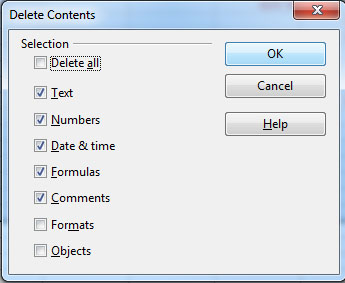
2. All of the transactions for this first budget cycle need to be deleted to make way for the second budget cycle transactions. Select cells A4 through U78 and press the Delete key on your keyboard. OpenOffice Calc will show the following dialog box:


You want to delete all the content of these cells, but not the formatting since that will rid the cells of their Currency formatting.

3. Finally, you need to modify three cells. First, change cell A1 from 2012-01 to 2012-02. Next change the Starting Balance date to Jan 15 and the Ending Balance date to Jan 31. Now the sheet is ready to accept transactions for the next budget cycle and can be saved with a filename of Budget-2012-02. Here’s what it should look like.

Download OpenOffice Version
Download Excel Version

In the next post, we’ll create some more sample transactions for the second budget cycle.

Saturday, January 7, 2012

Initializing the Spreadsheet

Now that we’ve got a budget spreadsheet built, it’s time to fill in some of the initial numbers. There are two sets of values that are needed: the Starting Balances and the Semimonthly Allowances. Let’s start with the latter since we determined these numbers in a previous post when we adjusted the category expenditures. At that time we settled on the monthly amounts for each category, whereas for the budget spreadsheet we need the semimonthly amounts. These values are simply half of the monthly amounts as can be seen in this table:


So, all that needs to be done is to enter the Modified Semimonthly numbers above into the spreadsheet on row 79 for the Semimonthly Allowances. We personally like to use even dollar amounts for our allowances, so we would round up the House Upkeep allowance to $38.

Next, we need to determine how much money to allot to each category as a Starting Balance on row 3. Actually, since you are adding money to each category twice a month, the only reason for putting any seed money into a category is that you have a regular payment due during this first budget period. Because you are just starting, you do not have any money from a previous budget in any category. So, if a monthly payment is due during this first budget period, you need seed money in order to have enough money to make the payment. For instance, suppose your $500 monthly mortgage payment is due 10 days into this first budget cycle. If you don’t put seed money into the Mortgage category, then you will only have $250 for making the payment. Thus, you need to set a Starting Balance for the Mortgage category of $250. You need to do something similar for any other budget categories where a payment is coming due soon. For the purpose of this exercise, let’s suppose you also have a utility bill, a TV cable bill, and some car insurance coming due. Also, let’s assume that you currently have $500 in your checking account. Then the Starting Balance allocations may look like this:


There seems to be a problem. You don’t have enough money in your checking account to cover the seed money needed. This means you are starting with a negative amount in the Savings category. That’s okay as long as the overall balance in your checking account stays above $0. If, however, you have too many payments coming due before you have a paycheck coming in, you might need to transfer some money from a another account to prevent an overdraft on your checking account. For our purposes here, let’s suppose your next paycheck will be deposited before any large bills are due so that no additional money is needed in your checking account. Remember too that you will be adding about $140 to the Savings category twice a month, so the $100 initial Savings deficit will go away on the first budget cycle.

Now, all that remains to be done is to enter the numbers from the above table to the Starting Balance row on the spreadsheet and resave it. It will look something like the partial view below:

Click here for image of full spreadsheet.

Now you are ready to complete your first budget spreadsheet. You can download readymade copies of the initialized spreadsheet using the following links:

OpenOffice.org format (.ods):
http://www.rkaproductions.com/files/Budget Spreadsheet Initialized.ods

Excel format (.xls):
http://www.rkaproductions.com/files/Budget Spreadsheet Initialized.xls

Thursday, December 29, 2011

Creating a Spreadsheet

Now that we’ve got a budget planned out, it’s time to create a spreadsheet to make it easy to maintain on a regular basis. The new year is a perfect time to begin a budget. We hope to have you in a position to start your budget by January 15, the time that the first transactions for the year need to entered into a spreadsheet.

The first decision to make is what spreadsheet software to use. There are many different programs varying widely in price that will work just fine. If you already own a copy of Microsoft Excel, we recommend that you use it. We currently use Excel 2007. However, essentially any version will do. If you already own another spreadsheet software package, it will most likely be acceptable since a budget spreadsheet does not require any fancy or complex processing. If you don’t already have spreadsheet software, we recommend you download the free open source OpenOffice.org (OOo) suite of productivity software (http://www.openoffice.org). One of the products in this suite is Calc, a spreadsheet program. It supports many of the same features included in Microsoft Excel and should work fine for budgeting. For our current purposes, we will be using OOo Calc just to show how a free product is more than capable of handling our budgetary needs. We are using OOo version 3.3.0. Its native file format's extension is “ods”; however, files can also be saved in Excel format (“xls”) should you ever decide to switch to Microsoft’s product.

There are a number of different ways a budget spreadsheet could be laid out, but we like the layout shown below.


It is not our mission to give instructions on how to use spreadsheet software. There are many existing books and Web sites that do a great job of that. Our mission is to show you how to set up an efficient budget spreadsheet. With that in mind, please note some of the features of the sheet above. Cell A1 shows the current year and the budget number for that year. If you follow our recommendation and update your budget twice a month, then you will be generating 24 sheets over the course of a year. The first budget sheet for a new year will be generated mid-January. The second one will be generated at the end of January, and the final one for the year at the end of December. Cell A1 should read 2012-02 for the second budget of the year. When the final budget sheet for the year is generated, cell A1 should read 2012-24.

Cells A2 through C3 show header information. Column A is formatted as Text and will be used to enter Transaction Numbers, thus its heading. A transaction number can be a check number, an online bill pay sequence number, or text like Deposit, Transfer, Debit, etc. Column B is formatted as Date (MMM DD) and will be used to enter the transaction date. The M-D-12 indicates that all the dates are months and days in the year 2012. Column C is formatted as Text and will be used for entering where the transactions took place, such as Best Buy, JCPenney, or Amazon.com.

Note that the date for the Starting Balance is Jan 01. At the bottom of the sheet in row 80 you see that the Ending Balance is for Jan 15. Once this budget sheet is complete and preparation is being made for the next semimonthly budget sheet, the Starting Balance date will be changed to Jan 15 and the Ending Balance date will be changed to Jan 31. We will discuss how to determine your Starting Balance for each budget category in the next post, as well as how to fill in the Semimonthly Allowance values in row 79.

Columns D through U contain the headers for the budget categories determined in previous posts. Below the appropriate headers will go the monetary amounts of each transaction. Therefore, rows 3 through 80 for columns D through U are formatted as Currency. Row 80 for each of these columns sum up all the amounts in rows 3 through 79. Thus this sum, for each column, represents the Starting Balance minus all the transaction amounts plus the Semimonthly Allowance for that column, resulting in an Ending Balance for the budget period.

Row 82 shows the overall balance for your checking account in column U (not shown in figure). This is simply a sum of all the Ending Balances from columns D through U. There is nothing magical about the number of rows that are allotted for transactions. We use a budget sheet with a total of 82 rows (includes the Total row). Over time we determined that it was rare for us to have so many transactions during a budget period as to exceed this number of rows. Also, it was about the maximum number of rows that would fit on a single landscape 8.5”x11” sheet of paper and still have text large enough to read. If you find that you need larger text, you can either use fewer rows or plan on printing the spreadsheet across two sheets of paper.

Notice that the headers are various colors to separate them. This is nice if you are using a color printer to create hardcopies of the budget sheets. If you use a black and white printer, then this is unnecessary.

Please download the blank budget spreadsheet using the links below so you can see the entire sheet on your computer:

OpenOffice.org format (.ods):
http://www.rkaproductions.com/files/Budget Spreadsheet Blank.ods

Excel format (.xls):
http://www.rkaproductions.com/files/Budget Spreadsheet Blank.xls

In the next post we’ll discuss how to initialize the blank sheet with Starting Balances and Semimonthly Allowances.

Cover Art

Sunday, December 4, 2011

Adjusting Expenditures Part 2

We now continue with adjusting expenditures in the remaining budget categories.

Insurance
This category may be difficult to reduce. You really need most of the types of insurance mentioned before in order to avoid debilitating debt should tragedy strike. Even so, with diligence some cuts should be possible. For instance, you might want to cut back on the amount of life insurance you have on family members. Some life and health policies allow discounted rates for people in good health. By exercising more and eating better, you might be able to qualify for these discounts. As a “side” benefit, you’ll feel better, also. By shopping around, you may find another insurance company that is cheaper than the one you currently use. A combination of these suggestions could get the cost of insurance down from $400 to $350 per month.

Debts
If at all possible, you don’t want to reduce your allotment of money for paying off old debts. Instead, you want to increase it to pay them off faster. For now, just leave the amount at $200 per month.

Cover Art

Personal
Whether you like it or not, you’re going to have to reduce the amount of money you spend on yourselves and your children. To become financially secure, such sacrifices are needed. Try cutting your monthly expenditures on each person in half; from $200 per person per month to $100. No, you won’t be able to buy new clothes as frequently or go to as many movies, but in the end you’ll be better off. Perhaps the family can stay at home and play games rather than going to a movie or a concert. Be creative, and cut that spending.

Miscellaneous
Since this category is for unaccounted for and unexpected expenditures, it will be difficult to know how much the allocation for this category can be cut. So, just leave it at $50 per month.

Credit Cards
If there is any category not to cut, it is this one. Most likely, your credit card debt is costing you more in interest than any other debts you have. Why pay all that money in interest when it could be used for buying things to better your family. You really want to pay your credit cards off as soon as possible. But, given there are other things you also need money for, there is only so much you can do. So, for now, leave the allocation for this budget category at $500 per month.

Savings
So, how did we do? With these reductions in your budget categories, how much money will you be able to save each month? The table below shows the original budget alongside the new numbers.


Wow! Can you believe that we were able to cut your monthly budget by over $1000 per month? With those cuts, you can now begin to save almost $300 per month rather than going further into debt to the tune of almost $800 per month. That is tremendous. And to make all these cuts more palatable, let’s look at how your finances will look in five years after paying off your credit cards and other debts (except your mortgage), assuming your income remains constant.


Again, Wow! Once you pay off your debts, you will be able to start saving almost $1000 per month. What would you do with an extra $12,000 each year? You’ll probably want to up your mortgage payment to get it paid off faster. You’ll also probably want to increase the amount of personal money you have available as a reward for a debt reduction job well done. Just don’t go overboard with these increased allotments. You don’t want to get back in the same financial condition you just worked so hard to get out of.

Next, we will discuss how to set up a spreadsheet for easily handling your semimonthly budget.